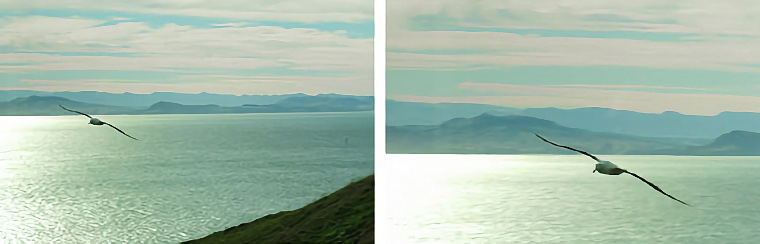
 Up to Photo Intro List Return to Previous Page Photography Tips: Cropping Cropping is the process of removing parts of a photo around the edges and leaving a selected center part behind. For digital photos or scanned conventional photos it is done on a computer using an image editing program, like Photoshop. It can be used to remove unwanted backgrounds, and concentrate on the foreground, and to rotate the photo. In the photos above you can see the photo on the left has two flaws: first, the albatross is too small and can't be seen in much detail; second, the horizon isn't straight which is makes the photo look unbalanced. There is another, more subtle, problem as well. The albatross is travelling to the left and is in the left middle of the photo. This makes it look as if the photo was taken too late and removes the impression of movement. In the photo at right above all three of the flaws have been fixed. The rotation is just 1° but it can still be easily seen - the horizon is now straight. The albatross now takes more of the frame and can be seen in more detail. Also, the albatross is at the bottom right of the photo which gives a feeling of movement to the left and up. Normally you should crop a photo to put the subject in the center because the photo will look too unnatural and static (note that all rules can be broken and having the subject in the center often does work, depending on the effect and degree of formality required). Obviously if you are going to zoom in to a photo like this without losing detail you need extra detail to start with. That's why I take all my photos at the camera's maximum resolution (5 megapixels in this case, but modern cameras have a lot more) even if I don't need all those pixels in the final photo. Also, don't zoom in too close or there won't be any extra surrounding area to discard when doing the crop. There's also a warning involved with doing this, as well as other digital manipulations. Even with a program which can do high quality rotation and re-sizing using interpolation, like Photoshop, there is an inevitable loss of quality with every operation so don't crop unless you are gaining something. And keep the original image as well as the processed one.
| |||||||||||||||||||
 CROPPING